Kody weekly: Access pages, a command menu, and plan moves
Kent C. Dodds · · 9 min read
Here is what shipped in Kody from November 7 to November 13, 2026. This week
team orgs get clear answers to "who can touch what," the dashboard gets a
keyboard command menu, and package authors get request signing, open realtime
for public apps, and a local kody dev that runs the real Kody workers. Three
changes affect publishing: see Breaking changes below.
See and change what each person can access
What shipped
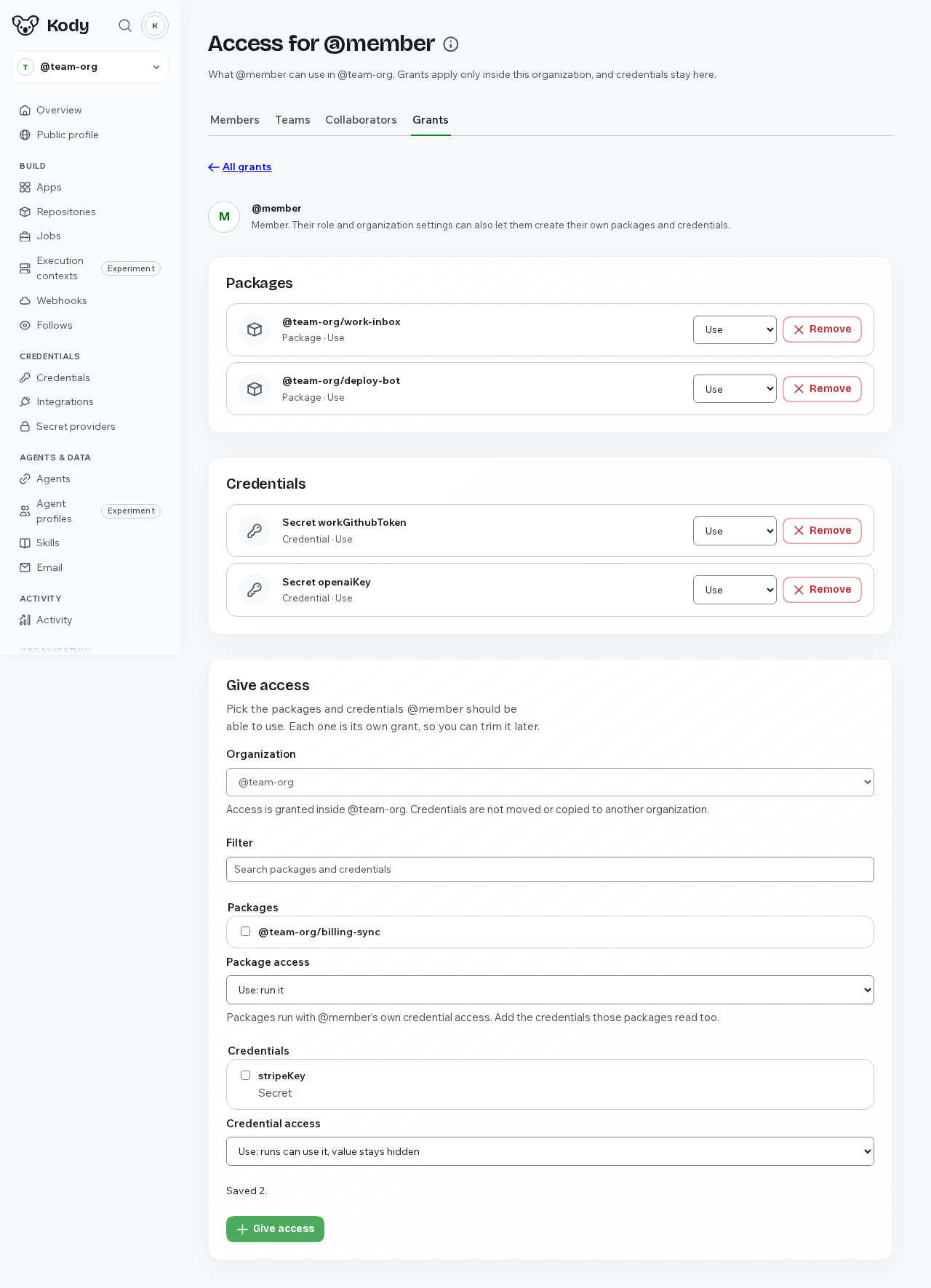
In a team org, Owners and Admins can open an Access page for any person from
Members, Collaborators, or Grants. It lists the packages, apps, and credentials
that person can use, and its Give access form grants or revokes a preset on
specific resources. Teams and everyone in the org get their own pages too, where
you change presets in place and remove grants. The Grants page now shows one row
per person, team, or the whole org with a short summary such as
3 packages, 2 credentials, plus search, filters, and paging. Owners can also
promote a trusted person to the new built-in Admin role: Admins can do
everything an Owner can except delete the org or change, remove, or promote
Owners, and those protections are enforced on the server for the website and MCP
alike.
Why it matters
With more than a few people, a flat list of grants could not tell you what one person can reach. Now you open their page and see it, change it there, and hand day-to-day org management to an Admin without giving away ownership.
Example
- Open your team org's Grants page and search for a teammate.
- Open their Access page, give them a package with Give access, and remove a credential they no longer need.
- On the Members page, promote a lead to Admin.
Docs: Organizations · PRs: #5003, #5017, #5023, #5014
Press Cmd+K to find and do anything
What shipped
Press Cmd+K (Ctrl+K on Windows and Linux), or the search button beside your avatar, to open a command menu. It fuzzy-searches workspace pages, repositories, jobs, credentials, memories, workflows, and docs, ranked by context, favorites, and what you use most. From the menu you can run or pause a job, cancel a workflow, refresh a connector's tools, and jump to a repository section. Navigation shortcuts are customizable, with key sequences and conflict detection. Search returns metadata only, never credential values.
Why it matters
Finding a job or a memory no longer means clicking through the sidebar and a list page. The actions you take most are a few keystrokes away.
Example
- Press Cmd+K and type part of a job name.
- Pick Run now on the result and confirm.
- Open the shortcut settings from the menu and bind your own key sequence for the Jobs page.
PR: #4940
Move a paid Pro plan to another org you own
What shipped
When an org has a paid Pro plan, its billing page links to a Move your plan
flow at /@your-org/-/billing/move-plan. You pick another org you own, review
the cost, seats, remaining prepaid value, and what happens to both orgs, then
confirm. The unused part of the plan becomes a credit in the target org, and the
source org moves to Free. Packages, credentials, connections, memories, inboxes,
storage, and members stay where they are. Only an Owner of both orgs can move a
plan.
Why it matters
If you paid for Pro on your personal org and then started a work org, you can move the plan instead of paying twice.
Example
- Open your org's Billing page and choose the move plan link.
- Pick the org the plan should go to and read the review.
- Check the acknowledgement box and continue to checkout for the target org.
Docs: Organizations · PR: #4980
Sign HTTP requests with an RSA key that stays in Kody
What shipped
Signing credentials can now produce RSA HTTP signatures (draft-cavage) for APIs
like Oracle Cloud. Package code describes the request, and
sign({ type: 'http-signature', ... }) returns only the headers to add. Kody
requires HTTPS, checks the URL host against the credential's allowed hosts, and
always signs the request target and host. Raw RSA signing (type: 'rsa-sha256')
is off for every credential. Only an Owner, signed in on the website, can turn
it on per credential, and every raw signature and refusal is listed on the
credential's page for 90 days.
Why it matters
APIs that authenticate each request with an RSA signature used to mean putting the private key in package code. Now the key stays in Kody and can only sign requests to the hosts you allow.
Example
const oci = await credential('oracle-api-key')
const url = 'https://iaas.us-ashburn-1.oraclecloud.com/20160918/instances'
const headers = await oci.sign({
	type: 'http-signature',
	keyId: 'YOUR_KEY_ID',
	method: 'GET',
	url,
})
await fetch(url, { headers })
Docs: Credentials · PR: #4977
Realtime for visitors on public package apps
What shipped
Internet-visible package apps can now open realtime sockets to anonymous
visitors and signed-in people outside your org. Opt in with
kody.app.realtime.anonymous set to "receive" (visitors get broadcasts only)
or "two-way" in package.json. The opt-in changes the app's capabilities, so
the owner approves it explicitly. Hook payloads include a visitor context so
your code can tell anonymous traffic apart, and platform limits on sockets,
messages, and sizes apply.
Why it matters
Live dashboards, status pages, and shared boards on a public app can update for every visitor, not only for members of the owning org.
Example
{
	"kody": {
		"app": {
			"entry": "src/app.ts",
			"realtime": { "anonymous": "receive" }
		}
	}
}
Docs: Package apps · PR: #5068
kody dev runs the real Kody workers on your machine
What shipped
kody dev now runs the actual Kody origin, platform, runtime, and job workers
locally, with only system boundaries (internet, secrets, email delivery, and
Cloudflare-only services) mocked. The PR lists 15 known gaps between local and
hosted behavior that this closes, including storage semantics, realtime,
scheduled jobs, and CPU limits. You can also pass kody dev --host to open your
local app from a phone or tablet on the same network. The default stays
loopback-only, a non-loopback bind prints a warning, and --target prod with
--host also requires --expose-prod.
Why it matters
A package that works under kody dev now behaves the same way when you publish
it, and you can test a package app's mobile layout on a real device.
Example
kody dev --host 0.0.0.0Open the printed network: URL on your phone.
Docs: Package apps · PRs: #5109, #5018
Reply-all from your Kody inbox
What shipped
When you put your Kody inbox on a thread from one of your verified addresses,
emailReply with reply_all: true now answers everyone on the message. To
stays on To, Cc stays on Cc, the inbox's own addresses are removed, and Bcc is
never sent. Reply-all works only on threads you put the inbox on, so a stranger
cannot use your Kody address to reach other people.
Why it matters
You can Cc your agent's inbox on a conversation with a client or a vendor and let it answer the whole thread instead of only the last sender.
Example
- Cc your Kody inbox on an email thread with outside participants.
- Ask your agent to answer the thread with
emailReplyandreply_all: true. - Everyone on To and Cc gets the reply.
Docs: Agent inbox · PR: #5084
Connect Instinct, and a simpler ChatGPT and Codex setup
What shipped
Instinct is a supported agent at /with/instinct and in the Get started and
Agents choosers. Its setup leads with the Kody CLI: install the CLI, run
kody login --device so Instinct can relay the approval code, then use
kody search and kody execute --local. ChatGPT and Codex now connect to Kody
as a custom MCP server by name and URL, with steps for the ChatGPT desktop app,
ChatGPT.com, and the Codex CLI. The /with pages also show each agent's "Kody
with" video, now including Muse, Pi, and Hermes.
Why it matters
You can connect the agent you already use with the setup that fits it, and watch what the pairing looks like before you connect.
Example
codex mcp add kody --url https://kody.codes/mcp
codex mcp login kody
Docs: Connect your agent · PRs: #5085, #5086, #5127, #5098, #5119
More updates
- Packages: Splits package Settings into Visibility, Source sharing, and Public release, and adds a commit picker for choosing which pending commit to publish. (#4976)
- Credentials: Brings back the org Integrations page below Credentials with a status per service, and lets you change OAuth scopes on one platform connection while showing the scopes the provider actually granted. (#4983, #4989)
- Apps: Adds sampled CPU and wall time per package app request to the Activity page. (#4988)
- Platform: Makes onboarding Step 2 look at what your connected agent already has (connections, skills, memories, instructions, repeating work) and help you move one into Kody. (docs, #5100)
- Apps: Shows "Package app not published yet" with a
kody package publishhint instead of a generic 500, and tells owners and Admins when unpublished changes wait behind a broken served commit. (#5104) - CLI: Saves one credential for
kody login,kody auth bootstrap, and git, with one precedence order:--token, thenKODY_API_TOKEN, then the saved login. (#5065, #5064) - Platform: Adds
kody.codes/download, which redirects to the latest desktop installer for your platform, and lets the desktop app approve a machine sign-in in its own window when you are already signed in. (#4947, #4955) - Plus smaller changes, including a "Creating in" workspace notice on credential, connect, and job forms (#4952), a new Apps empty state (#4948), adding a referrer from Billing within 72 hours of signup (#4957, #5030), and search batches that list a guide's details once (#5058). See the full release list.
Fixes
- MCP: Fixes MCP servers such as Datadog, Slack, and Figma failing to connect because their OAuth endpoints live on a sibling host. (#5136)
- Email: Fixes inbound email subscriptions that took minutes to start; they now run within seconds of receipt. (#5097)
- Automations: Fixes webhook URLs for team org packages returning 404 instead of reaching the package. (#4996, #4992)
- Packages: Fixes large publishes hitting the CPU limit, keeps jobs on the last good commit when a publish fails, and fixes 503s during package checks. (#5020, #5096)
- Packages: Fixes approval pages telling you to retry when an approval was still running after the browser timeout. (#5093)
- CLI: Fixes large credential
fetchuploads onkody execute --localgetting the local worker killed; bodies now stream with bounded memory. (#5025) - CLI: Fixes
kody loginlosing to a stale stored API token, and bootstrap logins being saved under your personal org instead of the team org. (#4954, #5102) - CLI: Fixes: tightens macOS Keychain handling in the CLI. (#5057)
Breaking changes
- Packages: An authoring publish now fails when package code sends a credential placeholder in a request body, URL path, URL query, or whole URL. Published packages keep running, and community installs only warn. Action: move the credential into a request header before your next publish. (docs, #4985)
- Packages: In hosted bundles, importing a subpath that a dependency's
exportsdoes not list is now a bundle error instead of falling back tomoduleormain, matching Node. Action: import a subpath the dependency exports. (#4967) - CLI:
kody auth setup-git --tokenand--scopesnow fail with a pointer tokody loginorkody auth bootstrap. Action: sign in with one of those first, then runkody auth setup-git. (#5065)
Try it
- Open your team org's Grants page and check one person's Access page, as described in Organizations.
- Press Cmd+K anywhere in the dashboard.
- Update the CLI and run
kody devon a package to try the local Kody workers.
Questions or feedback? Join us on the Kody Discord.